
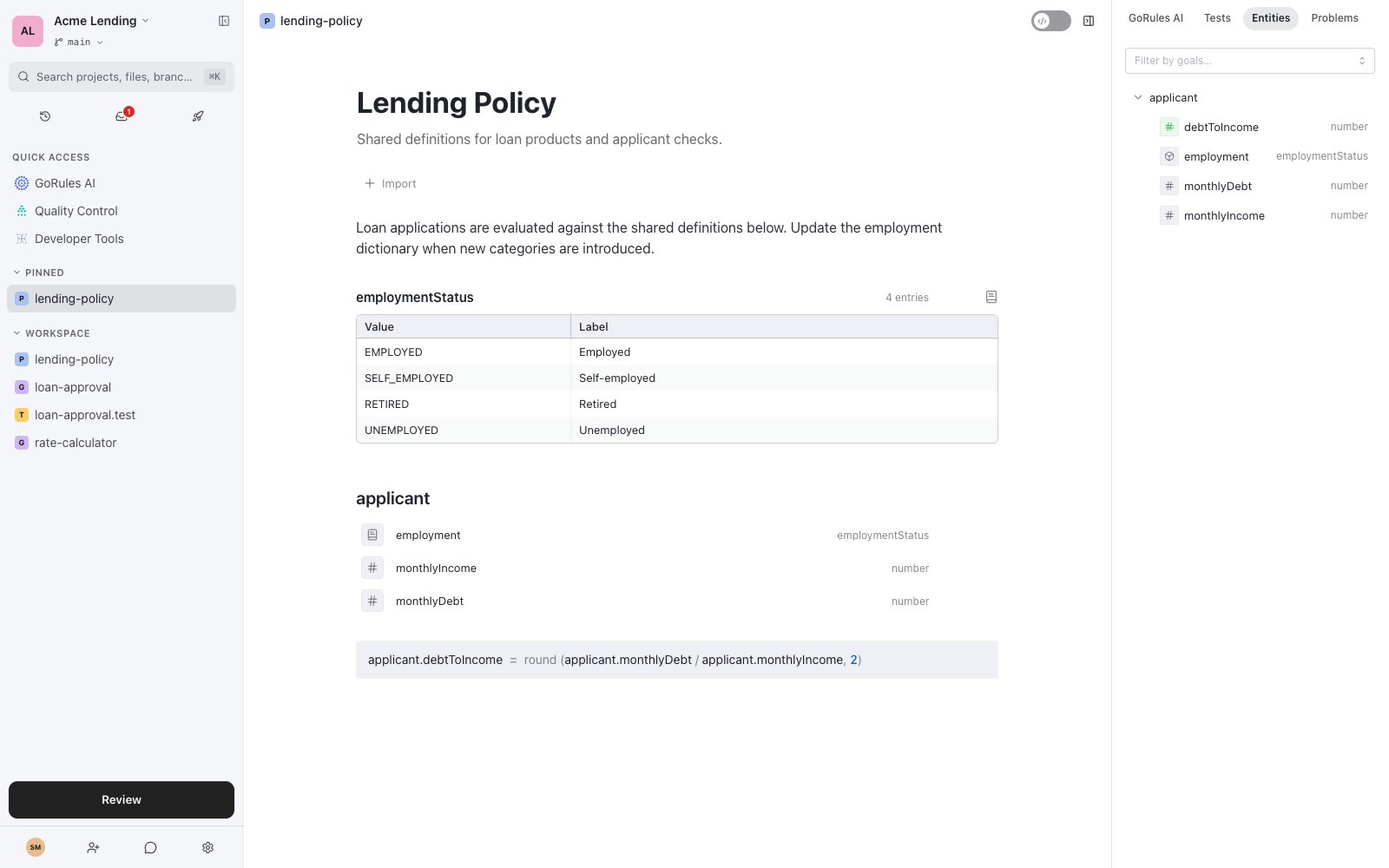
A policy with a dictionary, a data model, and a rule - with resolved entities on the right
If Policy doesn’t appear in the New dialog, policies are not enabled for your organisation. Ask your administrator or contact support about enabling them.
Writing a policy
Type/ anywhere in the document to insert a block. Text blocks (headings, paragraphs, lists) document your rules; rule blocks define them:
Block order doesn’t matter. If one block computes
applicant.debtToIncome and another reads it, the engine runs them in the right order - even across imported policies.
Dictionaries
A dictionary is a named set of values with human-readable labels:
The value is what rules compare against and what evaluation sees; the label is what business users read. In business mode, rules render with labels - “applicant.employment is one of Employed, Self-employed”.
Use a dictionary’s name as a type: a data model property typed
employmentStatus only accepts those four values, and static analysis flags anything else at edit time. Graphs that import the policy can do the same in their input schema - a field defined as {"$dictionary": "employmentStatus"} accepts only those values at evaluation time. Dictionaries also support CSV import and export for longer value lists.
Data models
A data model declares an entity -applicant, customer, order - and its properties with types: string, number, boolean, date, or any dictionary. Properties can be arrays or optional. Once declared, every rule that touches the entity is type-checked against it.
Importing
Graphs import policies with the Import button on the canvas; policies import other policies through theimports in their header. An import brings the whole chain: importing a policy also pulls in everything it imports.
Imported policies evaluate together as one unit in a shared namespace. That has a practical consequence: two blocks writing the same property is a conflict (DUPLICATE_WRITER) even when they live in different files - the analyzer checks the whole import group together.
Evaluating policies
A policy isn’t just a library - it’s directly executable. Send it an input object and it returns the object enriched with everything its blocks computed. Every policy gets its own HTTP endpoint alongside your graphs; see Developer Tools.The side panel
The Entities tab lists every entity the policy defines or touches: each property’s type, whether it’s declared or computed, which blocks write it, and where it’s used. The Problems tab shows static analysis findings for the policy.Related pages
Decision graphs
Import policies into your graphs.
Static analysis
How policies are checked across imports.