
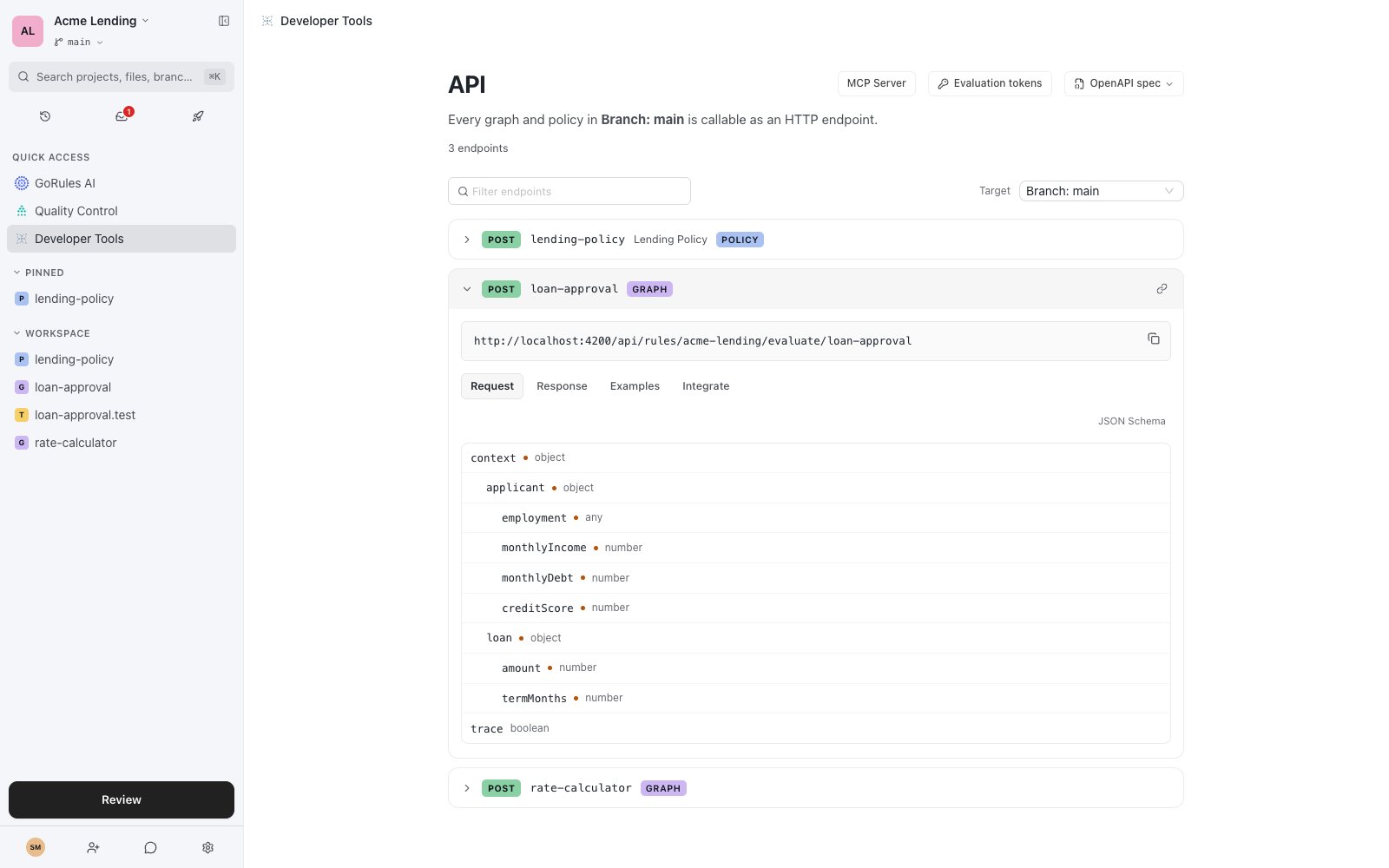
The API explorer in Developer Tools.
Evaluate a decision
All evaluation endpoints acceptPOST with the input wrapped in context, and authenticate with a project access token in the X-Access-Token header:
"trace": true to include a per-node trace object with each node’s input, output, and execution time.
Endpoints
{projectId} accepts either the project ID or the project key (acme-lending above). {path} is the document’s path within the project, for example loan-approval or billing/invoice-validation.
A
GET on each source root (the same URL without /evaluate/{path}) returns the OpenAPI document for that source.
Point production integrations at an environment: deploying a release swaps the rules behind the endpoint with no client changes. Branch and commit endpoints evaluate draft content, which is useful for CI and pre-production testing.
The Agent serves the same surface for the release it has loaded: POST /api/rules/{projectId}/evaluate/{path} and GET /api/rules/{projectId}. Requests, responses, and the OpenAPI document match BRMS, so integrations move between the two without client changes. The Agent requires a token only when the deployed release ships evaluation tokens; if none are scoped to the deployed target, it serves requests without authentication.
The legacy /api/projects/{projectId}/evaluate/{path} endpoints remain fully supported on both BRMS and the Agent, so existing integrations keep working unchanged.
API explorer
The Target selector switches every endpoint, schema, and snippet on the page between sources:Branch: main, any other branch, a commit, a release, an environment, or MCP Server (local).
Each endpoint expands into four tabs:
The Native toggle on the Integrate tab switches snippets from HTTP calls to the embedded ZEN Engine, evaluating the same document in-process with the SDKs.
Evaluation tokens
Evaluation endpoints authenticate with project access tokens, generated in project settings. A token is either Full access or restricted with Custom scopes:
Custom-scoped tokens also narrow which evaluation targets they may hit: Branch/Commit (the main-branch head, any branch head, and pinned commits), Releases, or a specific environment. Nothing selected means all targets. A token without scopes has full access.
On the API page, Evaluation tokens lists the tokens valid for the currently selected target, so you can copy one that will actually authorize the request.
OpenAPI spec
The OpenAPI spec dropdown offers Download JSON, Copy spec URL, and Copy cURL for the selected target. The same document is served by the API:apiKey scheme on the X-Access-Token header. Each operation carries an x-gorules extension with the document path, kind (graph or policy), a contentHash, hasInputSchema, and hasOutputSchema - enough metadata to drive client generators or your own tooling.
Generate typed clients
Because each operation’scontext schema is derived from the document’s input schema, any OpenAPI code generator turns the spec into compile-time types for your rules. With openapi-typescript:
context fail at compile time:
x-gorules.contentHash to detect when rules changed and types need regenerating - a natural CI step.
Fields typed with a dictionary appear in the spec as
{"$dictionary": "name"} - a GoRules extension, not standard JSON Schema. Evaluation enforces the dictionary’s values, but code generators don’t recognise the keyword and type such fields loosely.MCP server
The MCP Server tab in Developer Tools bridges the browser workspace to AI agents such as Claude Code and Cursor through a local MCP endpoint.41919 and prints a one-time 8-character token. Paste it into the MCP Server tab; the browser asks once for Local Network Access permission. The session status moves from Not connected through Verifying to Connected (or Blocked if the browser denies local network access).
A connected MCP client can:
- Read workspace files for the scope you’re viewing - drafts, releases, or change requests.
- Use the same tools as GoRules AI: add nodes, edit decision tables, plan changes.
- Evaluate decisions with trace, performance, and intermediate state.
localhost:41919 and tokens rotate every CLI session. For CLI flags and client configuration, see GoRules CLI and MCP integration.