
Decision graph
A decision graph is a visual canvas where you connect nodes to model decision logic. Data flows from an input node, through processing nodes, to an output node. Every decision graph has:- Input node - Receives the data you want to evaluate
- Processing nodes - Transform and evaluate the data (decision tables, expressions, functions, switches)
- Output node - Returns the final result (optional unless you need output validation)
Decision table
A decision table is a spreadsheet-like component for conditional logic. Rows define rules: conditions on the left, outcomes on the right. The engine evaluates rows top-to-bottom. By default, it returns the first matching row (first-hit policy). You can also collect all matching rows when needed. When to use: Conditional logic with multiple rules, lookup tables, classification, eligibility checks.Unary tests vs standard expressions
When an input column has a field name defined, cells use unary test syntax - shorthand expressions evaluated against that field:
When an input column has no field name (empty), cells use standard expressions instead. This lets you write full expressions like
customer.age > 18 and customer.country == 'US'.
Hit policies
Hit policies control how the engine handles multiple matching rows:
Output columns whose field ends in
[] collect their values across all matching rows, even under the First policy.
Expression node
An expression node transforms data using the ZEN expression language. Use it for calculations, mappings, and data manipulation. Use$ to reference the current expression node’s output. In the example above, $.subtotal refers to the subtotal field calculated earlier in the same node.
The operators and functions below work throughout GoRules - in expression nodes, decision table cells, and switch
conditions.
Operators
See Operators for the complete reference.
Built-in functions
See Built-in functions for the complete reference.
When to use: Calculations, data transformation, mapping values, combining fields.
Function node
A function node runs custom JavaScript for complex logic that expressions can’t handle. Use it when you need external API calls, complex algorithms, or operations that require full programming language capabilities.- ES6+ JavaScript - Modern syntax including async/await
- Built-in libraries -
dayjsfor dates,big.jsfor precision math,zodfor validation - Async operations - Await promises for API calls or async logic
Switch node
A switch node routes data through different paths based on conditions. It evaluates conditions in order and sends data down the first matching branch.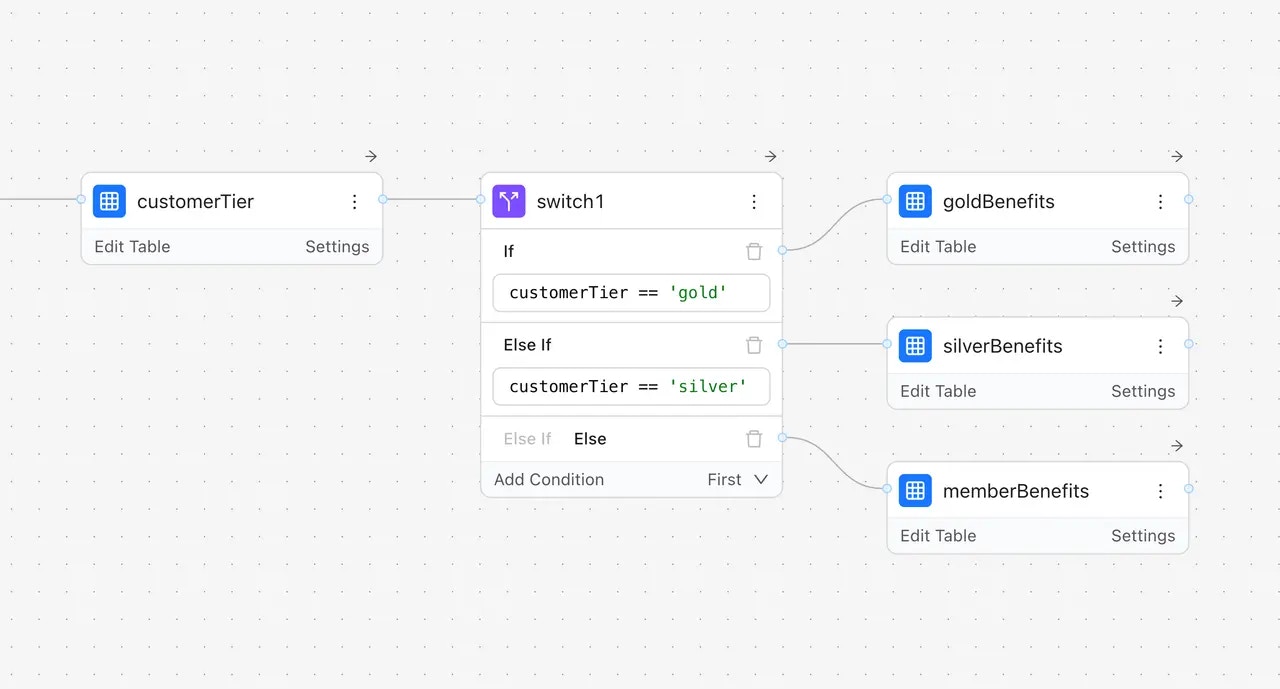
How data flows
When you evaluate a decision, data flows through the graph:- Input - You provide a JSON object with your data
- Processing - Each node receives data, processes it, and passes results forward
- Output - The final node returns the decision result
Output node is optional and most often it’s not used. Without one, the engine returns the results from all endpoint
nodes combined.
Pass-through behavior
By default, nodes use pass-through mode - they carry forward all incoming data plus their own outputs. This means downstream nodes can access both the original input and any values added by previous nodes.- Direct input - Data passed directly into the node
- Previous nodes - Output from upstream nodes in the graph
Referencing previous nodes
Use$nodes to access the output of any upstream node by its name:
{ rating: "good", score: 720 }. The Income Check node outputs { sufficient: true }. In the Final Decision expression node, you can combine both:
$nodes through the input parameter:
Special symbols
The$ symbol has different meanings depending on context:
JDM file format
Decision graphs are stored as JSON Decision Model (JDM) files. This portable format lets you:- Version control rules in Git
- Move rules between environments
- Share rules across applications
- Edit rules programmatically