> ## Documentation Index
> Fetch the complete documentation index at: https://docs.gorules.io/llms.txt
> Use this file to discover all available pages before exploring further.

# Key concepts

> Learn the building blocks of GoRules: decision graphs, decision tables, expressions, and functions.

export const DecisionGraphViz = ({nodes = [], edges = [], highlighted = null, title = null}) => {
  const nodeColors = {
    input: {
      bg: '#f8fafc',
      border: '#94a3b8',
      text: '#475569',
      icon: '→'
    },
    output: {
      bg: '#f8fafc',
      border: '#94a3b8',
      text: '#475569',
      icon: '←'
    },
    table: {
      bg: '#fefce8',
      border: '#d9c860',
      text: '#7c6f2a',
      icon: '▤'
    },
    expression: {
      bg: '#f5f3ff',
      border: '#a78bda',
      text: '#5b4a8c',
      icon: 'ƒ'
    },
    function: {
      bg: '#fdf2f8',
      border: '#e293b7',
      text: '#8c4a6d',
      icon: '{ }'
    },
    switch: {
      bg: '#f0fdfa',
      border: '#6bc4b8',
      text: '#3d7a72',
      icon: '◇'
    }
  };
  const nodeWidth = 140;
  const nodeHeight = 64;
  const horizontalGap = 80;
  const verticalGap = 24;
  const inDegree = {};
  const outEdges = {};
  nodes.forEach(n => {
    inDegree[n.id] = 0;
    outEdges[n.id] = [];
  });
  edges.forEach(e => {
    inDegree[e.to] = (inDegree[e.to] || 0) + 1;
    outEdges[e.from] = outEdges[e.from] || [];
    outEdges[e.from].push(e.to);
  });
  const queue = nodes.filter(n => inDegree[n.id] === 0).map(n => n.id);
  const nodeLevel = {};
  queue.forEach(id => nodeLevel[id] = 0);
  const tempInDegree = {
    ...inDegree
  };
  while (queue.length > 0) {
    const current = queue.shift();
    const currentLevel = nodeLevel[current];
    (outEdges[current] || []).forEach(next => {
      nodeLevel[next] = Math.max(nodeLevel[next] || 0, currentLevel + 1);
      tempInDegree[next]--;
      if (tempInDegree[next] === 0) queue.push(next);
    });
  }
  const levels = {};
  nodes.forEach(n => {
    const level = nodeLevel[n.id] || 0;
    levels[level] = levels[level] || [];
    levels[level].push(n);
  });
  const nodePositions = {};
  const numLevels = Object.keys(levels).length;
  const maxNodesInLevel = Math.max(...Object.values(levels).map(l => l.length), 1);
  const canvasHeight = Math.max(maxNodesInLevel * (nodeHeight + verticalGap) + 60, 180);
  const canvasWidth = numLevels * (nodeWidth + horizontalGap) + 80;
  Object.entries(levels).forEach(([level, levelNodes]) => {
    const levelNum = parseInt(level);
    const x = 40 + levelNum * (nodeWidth + horizontalGap);
    const totalHeight = levelNodes.length * nodeHeight + (levelNodes.length - 1) * verticalGap;
    const startY = (canvasHeight - totalHeight) / 2;
    levelNodes.forEach((node, index) => {
      nodePositions[node.id] = {
        x,
        y: startY + index * (nodeHeight + verticalGap)
      };
    });
  });
  const edgePaths = edges.map((edge, i) => {
    const from = nodePositions[edge.from];
    const to = nodePositions[edge.to];
    if (!from || !to) return null;
    const startX = from.x + nodeWidth;
    const startY = from.y + nodeHeight / 2;
    const endX = to.x - 6;
    const endY = to.y + nodeHeight / 2;
    const dx = endX - startX;
    const controlOffset = Math.min(dx * 0.4, 40);
    return {
      key: `edge-${i}`,
      path: `M ${startX} ${startY} C ${startX + controlOffset} ${startY}, ${endX - controlOffset} ${endY}, ${endX} ${endY}`
    };
  }).filter(Boolean);
  const uniqueId = `graph-${Math.random().toString(36).substring(2, 11)}`;
  const containerRef = useRef(null);
  const [scale, setScale] = useState(1);
  const [position, setPosition] = useState({
    x: 0,
    y: 0
  });
  const [isDragging, setIsDragging] = useState(false);
  const [dragStart, setDragStart] = useState({
    x: 0,
    y: 0
  });
  const handleWheel = e => {
    e.preventDefault();
    const delta = e.deltaY > 0 ? -0.1 : 0.1;
    setScale(s => Math.max(0.4, Math.min(2, s + delta)));
  };
  const handleMouseDown = e => {
    if (e.target.closest('button')) return;
    setIsDragging(true);
    setDragStart({
      x: e.clientX - position.x,
      y: e.clientY - position.y
    });
  };
  const handleMouseMove = e => {
    if (!isDragging) return;
    setPosition({
      x: e.clientX - dragStart.x,
      y: e.clientY - dragStart.y
    });
  };
  const handleMouseUp = () => setIsDragging(false);
  const handleFit = () => {
    const container = containerRef.current;
    if (container) {
      const containerWidth = container.clientWidth - 40;
      const containerHeight = container.clientHeight - 80;
      const scaleX = containerWidth / canvasWidth;
      const scaleY = containerHeight / canvasHeight;
      const fitScale = Math.min(scaleX, scaleY, 1);
      setScale(Math.max(0.4, fitScale));
    } else {
      setScale(1);
    }
    setPosition({
      x: 0,
      y: 0
    });
  };
  const handleZoomIn = () => setScale(s => Math.min(s + 0.15, 2));
  const handleZoomOut = () => setScale(s => Math.max(s - 0.15, 0.4));
  useEffect(() => {
    const container = containerRef.current;
    if (container) {
      container.addEventListener('wheel', handleWheel, {
        passive: false
      });
      return () => container.removeEventListener('wheel', handleWheel);
    }
  }, []);
  useEffect(() => {
    const timer = setTimeout(() => {
      const container = containerRef.current;
      if (container) {
        const containerWidth = container.clientWidth - 40;
        const containerHeight = container.clientHeight - 80;
        const scaleX = containerWidth / canvasWidth;
        const scaleY = containerHeight / canvasHeight;
        const fitScale = Math.min(scaleX, scaleY, 1);
        setScale(Math.max(0.4, fitScale));
      }
    }, 0);
    return () => clearTimeout(timer);
  }, [canvasWidth, canvasHeight]);
  const containerHeight = Math.max(300, Math.min(canvasHeight + 80, 420));
  return <div style={{
    marginTop: '16px',
    marginBottom: '24px'
  }}>
      {title && <div style={{
    fontSize: '13px',
    fontWeight: '500',
    color: '#64748b',
    marginBottom: '8px',
    fontFamily: 'system-ui, -apple-system, sans-serif'
  }}>
          {title}
        </div>}
      <div ref={containerRef} onMouseDown={handleMouseDown} onMouseMove={handleMouseMove} onMouseUp={handleMouseUp} onMouseLeave={handleMouseUp} style={{
    position: 'relative',
    border: '1px solid #e5e7eb',
    borderRadius: '12px',
    backgroundColor: '#f9fafb',
    overflow: 'hidden',
    height: containerHeight,
    cursor: isDragging ? 'grabbing' : 'grab',
    userSelect: 'none'
  }}>
        {}
        <div style={{
    position: 'absolute',
    top: '12px',
    right: '12px',
    display: 'flex',
    gap: '6px',
    zIndex: 10
  }}>
          <button onClick={handleZoomIn} style={{
    width: '32px',
    height: '32px',
    border: '1px solid #d1d5db',
    borderRadius: '8px',
    backgroundColor: 'white',
    cursor: 'pointer',
    display: 'flex',
    alignItems: 'center',
    justifyContent: 'center',
    fontSize: '18px',
    color: '#6b7280',
    fontWeight: '400',
    boxShadow: '0 1px 2px rgba(0,0,0,0.05)',
    transition: 'background-color 0.15s'
  }} onMouseOver={e => e.target.style.backgroundColor = '#f3f4f6'} onMouseOut={e => e.target.style.backgroundColor = 'white'}>+</button>
          <button onClick={handleZoomOut} style={{
    width: '32px',
    height: '32px',
    border: '1px solid #d1d5db',
    borderRadius: '8px',
    backgroundColor: 'white',
    cursor: 'pointer',
    display: 'flex',
    alignItems: 'center',
    justifyContent: 'center',
    fontSize: '18px',
    color: '#6b7280',
    fontWeight: '400',
    boxShadow: '0 1px 2px rgba(0,0,0,0.05)',
    transition: 'background-color 0.15s'
  }} onMouseOver={e => e.target.style.backgroundColor = '#f3f4f6'} onMouseOut={e => e.target.style.backgroundColor = 'white'}>−</button>
          <button onClick={handleFit} style={{
    height: '32px',
    padding: '0 12px',
    border: '1px solid #d1d5db',
    borderRadius: '8px',
    backgroundColor: 'white',
    cursor: 'pointer',
    fontSize: '12px',
    fontWeight: '500',
    color: '#6b7280',
    fontFamily: 'system-ui, -apple-system, sans-serif',
    boxShadow: '0 1px 2px rgba(0,0,0,0.05)',
    transition: 'background-color 0.15s'
  }} onMouseOver={e => e.target.style.backgroundColor = '#f3f4f6'} onMouseOut={e => e.target.style.backgroundColor = 'white'}>Reset</button>
        </div>

        {}
        <div style={{
    transform: `translate(calc(-50% + ${position.x}px), calc(-50% + ${position.y}px)) scale(${scale})`,
    transformOrigin: 'center center',
    width: canvasWidth,
    height: canvasHeight,
    position: 'absolute',
    left: '50%',
    top: '50%'
  }}>
          {}
          <svg style={{
    position: 'absolute',
    top: 0,
    left: 0,
    width: canvasWidth,
    height: canvasHeight,
    pointerEvents: 'none',
    overflow: 'visible'
  }}>
            <defs>
              <marker id={`${uniqueId}-arrow`} markerWidth="8" markerHeight="8" refX="6" refY="4" orient="auto" markerUnits="strokeWidth">
                <path d="M0,1 L6,4 L0,7 L2,4 Z" fill="#9ca3af" />
              </marker>
            </defs>
            {edgePaths.map(edge => <path key={edge.key} d={edge.path} fill="none" stroke="#d1d5db" strokeWidth="2" strokeLinecap="round" markerEnd={`url(#${uniqueId}-arrow)`} />)}
          </svg>

          {}
          {nodes.map(node => {
    const pos = nodePositions[node.id];
    if (!pos) return null;
    const colors = nodeColors[node.type] || nodeColors.expression;
    const isHighlighted = highlighted === node.id;
    return <div key={node.id} style={{
      position: 'absolute',
      left: pos.x,
      top: pos.y,
      width: nodeWidth,
      height: nodeHeight,
      backgroundColor: isHighlighted ? '#fef2f2' : colors.bg,
      border: `1.5px solid ${isHighlighted ? '#f87171' : colors.border}`,
      borderRadius: '10px',
      display: 'flex',
      flexDirection: 'column',
      alignItems: 'center',
      justifyContent: 'center',
      boxShadow: isHighlighted ? '0 0 0 2px rgba(248, 113, 113, 0.25)' : '0 1px 2px rgba(0,0,0,0.04)',
      cursor: 'default'
    }}>
                <div style={{
      fontSize: '14px',
      marginBottom: '3px',
      color: isHighlighted ? '#ef4444' : colors.text,
      opacity: 0.85
    }}>
                  {colors.icon}
                </div>
                <div style={{
      fontSize: '11px',
      fontWeight: '500',
      color: isHighlighted ? '#dc2626' : colors.text,
      textAlign: 'center',
      padding: '0 8px',
      fontFamily: 'system-ui, -apple-system, sans-serif',
      lineHeight: '1.35',
      maxWidth: '100%'
    }}>
                  {node.label}
                </div>
              </div>;
  })}
        </div>

        {}
        <div style={{
    position: 'absolute',
    bottom: '12px',
    left: '12px',
    display: 'flex',
    gap: '14px',
    padding: '8px 12px',
    fontSize: '11px',
    color: '#6b7280',
    fontFamily: 'system-ui, -apple-system, sans-serif',
    backgroundColor: 'white',
    borderRadius: '8px',
    border: '1px solid #e5e7eb',
    boxShadow: '0 1px 2px rgba(0,0,0,0.05)'
  }}>
          {Object.entries(nodeColors).map(([type, colors]) => <div key={type} style={{
    display: 'flex',
    alignItems: 'center',
    gap: '5px'
  }}>
              <div style={{
    width: '16px',
    height: '16px',
    backgroundColor: colors.bg,
    border: `1px solid ${colors.border}`,
    borderRadius: '4px',
    display: 'flex',
    alignItems: 'center',
    justifyContent: 'center',
    fontSize: '9px',
    color: colors.text
  }}>
                {colors.icon}
              </div>
              <span style={{
    textTransform: 'capitalize'
  }}>{type}</span>
            </div>)}
        </div>
      </div>
    </div>;
};

export const ExpressionViz = ({entries = []}) => {
  const allCells = entries.flatMap((entry, i) => [<div key={`key-${i}`} style={{
    backgroundColor: '#dbeafe',
    color: '#1e40af',
    padding: '12px 16px',
    borderRadius: '8px',
    fontFamily: 'ui-monospace, monospace',
    fontSize: '14px',
    fontWeight: '500'
  }}>
      {entry.key}
    </div>, <div key={`val-${i}`} style={{
    backgroundColor: '#ffffff',
    color: '#334155',
    padding: '12px 16px',
    borderRadius: '8px',
    fontFamily: 'ui-monospace, monospace',
    fontSize: '14px',
    border: '1px solid #e2e8f0'
  }}>
      {entry.value}
    </div>]);
  return <div style={{
    backgroundColor: '#f1f5f9',
    borderRadius: '12px',
    padding: '20px',
    margin: '16px 0'
  }}>
      <div style={{
    display: 'grid',
    gridTemplateColumns: 'auto 1fr',
    gap: '8px'
  }}>
        {allCells}
      </div>
    </div>;
};

export const DecisionTableViz = ({inputs = [], outputs = [], rows = []}) => {
  const colCount = inputs.length + outputs.length;
  const getFieldDisplay = field => !field || field === '-' ? '-' : field;
  const allCells = rows.flatMap((row, ri) => [...inputs.map((input, i) => <div key={`c-${ri}-in-${i}`} style={{
    backgroundColor: '#ffffff',
    padding: '12px 16px',
    borderRadius: '8px',
    fontFamily: 'ui-monospace, monospace',
    fontSize: '14px',
    border: '1px solid #e2e8f0'
  }}>
        {row[input.field] ?? ''}
      </div>), ...outputs.map((output, i) => <div key={`c-${ri}-out-${i}`} style={{
    backgroundColor: '#ffffff',
    padding: '12px 16px',
    borderRadius: '8px',
    fontFamily: 'ui-monospace, monospace',
    fontSize: '14px',
    border: '1px solid #e2e8f0'
  }}>
        {row[output.field] ?? ''}
      </div>)]);
  return <div style={{
    backgroundColor: '#f1f5f9',
    borderRadius: '12px',
    padding: '20px',
    overflowX: 'auto',
    margin: '16px 0'
  }}>
      <div style={{
    display: 'grid',
    gridTemplateColumns: `repeat(${colCount}, 1fr)`,
    gap: '8px'
  }}>
        {}
        <div key="group-inputs" style={{
    gridColumn: `span ${inputs.length}`,
    padding: '8px 16px',
    fontWeight: '600',
    fontSize: '13px',
    color: '#374151',
    borderBottom: '2px solid #e2e8f0'
  }}>
          Inputs
        </div>
        <div key="group-outputs" style={{
    gridColumn: `span ${outputs.length}`,
    padding: '8px 16px',
    fontWeight: '600',
    fontSize: '13px',
    color: '#374151',
    borderBottom: '2px solid #e2e8f0'
  }}>
          Outputs
        </div>

        {}
        {inputs.map((input, i) => <div key={`h-in-${i}`} style={{
    backgroundColor: '#f0abfc',
    color: '#581c87',
    padding: '12px 16px',
    borderRadius: '8px',
    fontWeight: '500'
  }}>
            <div>{input.name}</div>
            <div style={{
    display: 'inline-block',
    marginTop: '6px',
    padding: '2px 8px',
    fontSize: '12px',
    fontWeight: '400',
    backgroundColor: 'rgba(88, 28, 135, 0.15)',
    borderRadius: '4px',
    fontFamily: 'ui-monospace, monospace'
  }}>
              {getFieldDisplay(input.field)}
            </div>
          </div>)}
        {outputs.map((output, i) => <div key={`h-out-${i}`} style={{
    backgroundColor: '#a5b4fc',
    color: '#312e81',
    padding: '12px 16px',
    borderRadius: '8px',
    fontWeight: '500'
  }}>
            <div>{output.name}</div>
            <div style={{
    display: 'inline-block',
    marginTop: '6px',
    padding: '2px 8px',
    fontSize: '12px',
    fontWeight: '400',
    backgroundColor: 'rgba(49, 46, 129, 0.15)',
    borderRadius: '4px',
    fontFamily: 'ui-monospace, monospace'
  }}>
              {getFieldDisplay(output.field)}
            </div>
          </div>)}

        {}
        {allCells}
      </div>
    </div>;
};

GoRules uses a visual decision graph model. Understanding these building blocks helps you work effectively with the platform.

## Decision graph

A decision graph is a visual canvas where you connect nodes to model decision logic. Data flows from an input node, through processing nodes, to an output node.

<DecisionGraphViz
  nodes={[
{ id: "input", type: "input", label: "Input" },
{ id: "table", type: "table", label: "Decision Table" },
{ id: "expression", type: "expression", label: "Expression" },
{ id: "output", type: "output", label: "Output" }
]}
  edges={[
{ from: "input", to: "table" },
{ from: "table", to: "expression" },
{ from: "expression", to: "output" }
]}
/>

Every decision graph has:

* **Input node** — Receives the data you want to evaluate
* **Processing nodes** — Transform and evaluate the data (decision tables, expressions, functions, switches)
* **Output node** — Returns the final result (optional unless you need output validation)

You build graphs by dragging nodes onto the canvas and connecting them. Data flows through the connections, with each node receiving input from the previous node and passing output to the next.

## Decision table

A decision table is a spreadsheet-like component for conditional logic. Rows define rules: conditions on the left, outcomes on the right.

<DecisionTableViz
  inputs={[
{ name: "Customer Tier", field: "customer.tier" },
{ name: "Order Amount", field: "order.amount" }
]}
  outputs={[
{ name: "Discount %", field: "discount" }
]}
  rows={[
{ "customer.tier": '"gold"', "order.amount": ">= 100", discount: "0.15" },
{ "customer.tier": '"gold"', "order.amount": "< 100", discount: "0.10" },
{ "customer.tier": '"silver"', "order.amount": ">= 100", discount: "0.10" },
{ "customer.tier": '"silver"', "order.amount": "< 100", discount: "0.05" },
{ "customer.tier": "", "order.amount": "", discount: "0" }
]}
/>

The engine evaluates rows top-to-bottom. By default, it returns the first matching row (first-hit policy). You can also collect all matching rows when needed.

**When to use:** Conditional logic with multiple rules, lookup tables, classification, eligibility checks.

### Unary tests vs standard expressions

When an input column has a **field name defined**, cells use unary test syntax — shorthand expressions evaluated against that field:

| Operator          | Example                  | Matches                         |
| ----------------- | ------------------------ | ------------------------------- |
| Comparison        | `> 100`, `<= 50`, `!= 0` | Values matching the comparison  |
| Range (inclusive) | `[1..10]`                | Values from 1 to 10             |
| Range (exclusive) | `(0..100)`               | Values between 0 and 100        |
| List              | `'US', 'GB', 'CA'`       | Any value in the list           |
| Combined          | `> 5 and < 10`           | Values matching both conditions |
| Any               | *(empty)*                | Matches any value               |

When an input column has **no field name** (empty), cells use standard expressions instead. This lets you write full expressions like `customer.age > 18 and customer.country == 'US'`.

### Hit policies

Hit policies control how the engine handles multiple matching rows:

| Policy      | Behavior                                 |
| ----------- | ---------------------------------------- |
| **First**   | Returns the first matching row (default) |
| **Collect** | Returns all matching rows as an array    |

## Expression node

An expression node transforms data using the ZEN expression language. Use it for calculations, mappings, and data manipulation.

<ExpressionViz
  entries={[
{ key: "subtotal", value: "sum(map(cart.items, #.price * #.quantity))" },
{ key: "tax", value: "$.subtotal * 0.08" },
{ key: "total", value: "$.subtotal + tax" },
{ key: "freeShipping", value: "$.subtotal > 50" }
]}
/>

Use `$` to reference the current expression node's output. In the example above, `$.subtotal` refers to the `subtotal` field calculated earlier in the same node.

<Note>
  The operators and functions below work throughout GoRules — in expression nodes, decision table cells, and switch
  conditions.
</Note>

### Operators

| Type            | Operators                            |
| --------------- | ------------------------------------ |
| Arithmetic      | `+`, `-`, `*`, `/`, `%`, `^` (power) |
| Comparison      | `==`, `!=`, `>`, `<`, `>=`, `<=`     |
| Logical         | `and`, `or`, `not`                   |
| Ternary         | `condition ? then : else`            |
| Null coalescing | `value ?? fallback`                  |
| Range check     | `x in [1..10]`, `x not in (0..100)`  |

See [Operators](/learn/zen-language/operators) for the complete reference.

### Built-in functions

| Category | Functions                                                                                 |
| -------- | ----------------------------------------------------------------------------------------- |
| Math     | `abs`, `floor`, `ceil`, `round`, `min`, `max`, `sum`, `avg`, `median`                     |
| String   | `len`, `upper`, `lower`, `trim`, `contains`, `startsWith`, `endsWith`, `matches`, `split` |
| Array    | `map`, `filter`, `some`, `all`, `one`, `none`, `count`, `flatMap`, `keys`, `values`       |
| Date     | `d()`, `duration`                                                                         |
| Type     | `string`, `number`, `bool`, `type`, `isNumeric`                                           |

See [Built-in functions](/learn/zen-language/functions) for the complete reference.

**When to use:** Calculations, data transformation, mapping values, combining fields.

## Function node

A function node runs custom JavaScript for complex logic that expressions can't handle. Use it when you need external API calls, complex algorithms, or operations that require full programming language capabilities.

```javascript theme={null}
/** @type {Handler} **/
export const handler = async (input) => {
  const { customerId, orderTotal } = input;

  // Complex loyalty calculation
  const loyaltyPoints = Math.floor(orderTotal * 1.5);

  // Date-based promotions
  const today = dayjs();
  const isWeekend = today.day() === 0 || today.day() === 6;
  const bonusMultiplier = isWeekend ? 2 : 1;

  return {
    loyaltyPoints: loyaltyPoints * bonusMultiplier,
    earnedOn: today.format('YYYY-MM-DD')
  };
};
```

Function nodes support:

* **ES6+ JavaScript** — Modern syntax including async/await
* **Built-in libraries** — `dayjs` for dates, `big.js` for precision math, `zod` for validation
* **Async operations** — Await promises for API calls or async logic

**When to use:** Complex algorithms, async operations, logic that requires full JavaScript capabilities.

## Switch node

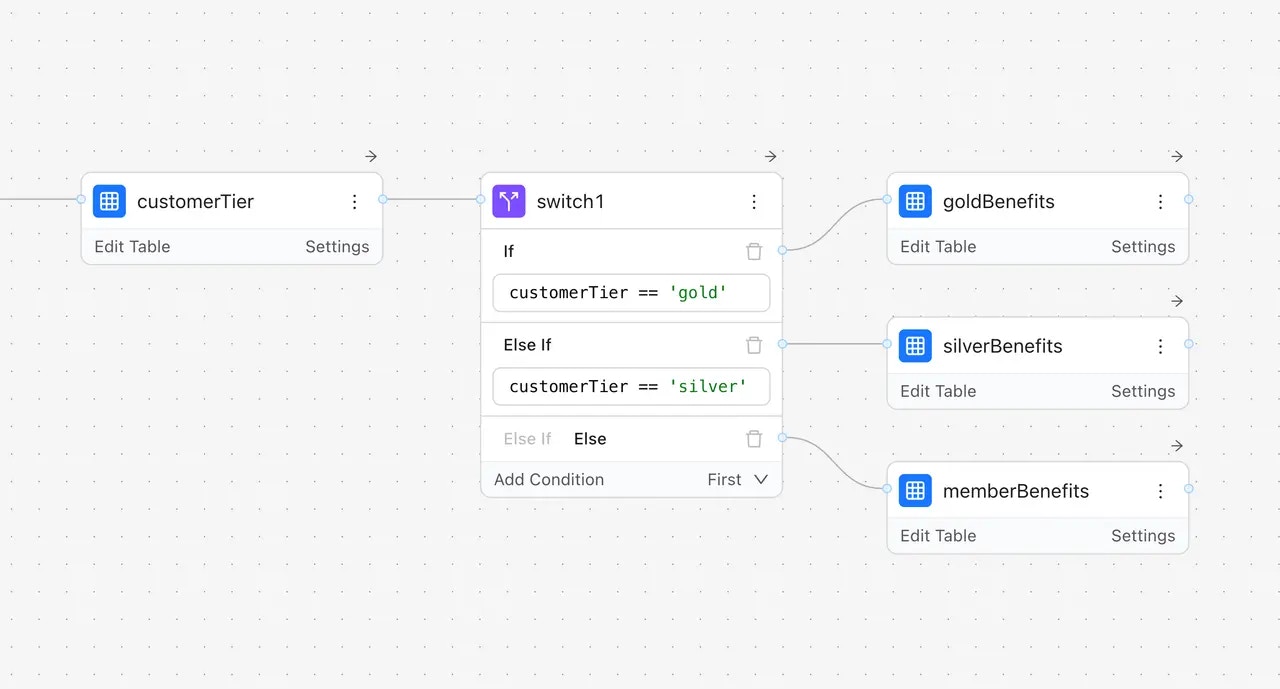
A switch node routes data through different paths based on conditions. It evaluates conditions in order and sends data down the first matching branch.

<Frame>
  <img src="https://mintcdn.com/gorules/blshCzPfx9UBHQOu/images/switch-node.webp?fit=max&auto=format&n=blshCzPfx9UBHQOu&q=85&s=e629d941a20eb3a5599f6140a693ae2e" alt="Switch node" style={{ aspectRatio: 560 / 301 }} width="1280" height="689" data-path="images/switch-node.webp" />
</Frame>

Each branch leads to its own chain of nodes, allowing you to build parallel processing paths that merge back into a single output.

**When to use:** Conditional branching, routing logic, different processing paths based on input values.

## How data flows

When you evaluate a decision, data flows through the graph:

1. **Input** — You provide a JSON object with your data
2. **Processing** — Each node receives data, processes it, and passes results forward
3. **Output** — The final node returns the decision result

<Note>
  Output node is optional and most often it's not used. Without one, the engine returns the results from all endpoint
  nodes combined.
</Note>

### Pass-through behavior

By default, nodes use **pass-through mode** — they carry forward all incoming data plus their own outputs. This means downstream nodes can access both the original input and any values added by previous nodes.

```
Input: { customer: { tier: "gold" }, order: { total: 150 } }
     ↓
Decision Table adds: { discount: 0.15 }
     ↓
Output: { customer: { tier: "gold" }, order: { total: 150 }, discount: 0.15 }
```

You can disable pass-through on any node when you want to return only that node's output fields. The **→** icon on a node indicates pass-through is enabled.

```javascript theme={null}
// Input
{
  "customer": { "tier": "gold", "yearsActive": 3 },
  "order": { "subtotal": 150, "items": 5 }
}

// Output (after flowing through the graph)
{
  "discount": 15,
  "freeShipping": true,
  "loyaltyBonus": 225
}
```

Nodes can access data from:

* **Direct input** — Data passed directly into the node
* **Previous nodes** — Output from upstream nodes in the graph

### Referencing previous nodes

Use `$nodes` to access the output of any upstream node by its name:

```
$nodes.DiscountTable.discount      // Output from a node named "DiscountTable"
$nodes.RiskScore.level             // Output from a node named "RiskScore"
$nodes["My Node"].value            // Use brackets for names with spaces
```

This lets you build multi-stage decisions where later nodes use results from earlier ones.

**Example: Multi-stage loan decision**

```
[Input] → [Credit Score] → [Income Check] → [Final Decision]
```

The Credit Score node outputs `{ rating: "good", score: 720 }`. The Income Check node outputs `{ sufficient: true }`. In the Final Decision expression node, you can combine both:

```
approved = $nodes.CreditScore.rating in ['good', 'excellent'] and $nodes.IncomeCheck.sufficient
```

In function nodes, access `$nodes` through the input parameter:

```javascript theme={null}
const creditRating = input.$nodes.CreditScore.rating;
const incomeOk = input.$nodes.IncomeCheck.sufficient;
```

### Special symbols

The `$` symbol has different meanings depending on context:

| Symbol   | Context                     | Meaning                                                 |
| -------- | --------------------------- | ------------------------------------------------------- |
| `$`      | Expression node             | Reference to current node's output (e.g., `$.subtotal`) |
| `$`      | Unary test (decision table) | The field value being tested (e.g., `len($) > 5`)       |
| `$nodes` | Any node                    | Access output from previous nodes                       |
| `$root`  | Expression node             | The entire context object                               |
| `#`      | Array iteration             | Current element in `map`, `filter`, etc.                |

## JDM file format

Decision graphs are stored as JSON Decision Model (JDM) files. This portable format lets you:

* Version control rules in Git
* Move rules between environments
* Share rules across applications
* Edit rules programmatically

You don't need to understand the JDM format to use GoRules — the visual editor handles it automatically. But if you want to work with rules programmatically, the format is documented in the [JDM Format section](/learn/jdm-format/standard).
