> ## Documentation Index
> Fetch the complete documentation index at: https://docs.gorules.io/llms.txt
> Use this file to discover all available pages before exploring further.
# Developer tools
> Call any graph or policy as an HTTP endpoint, generate clients from OpenAPI, and bridge your workspace to MCP.
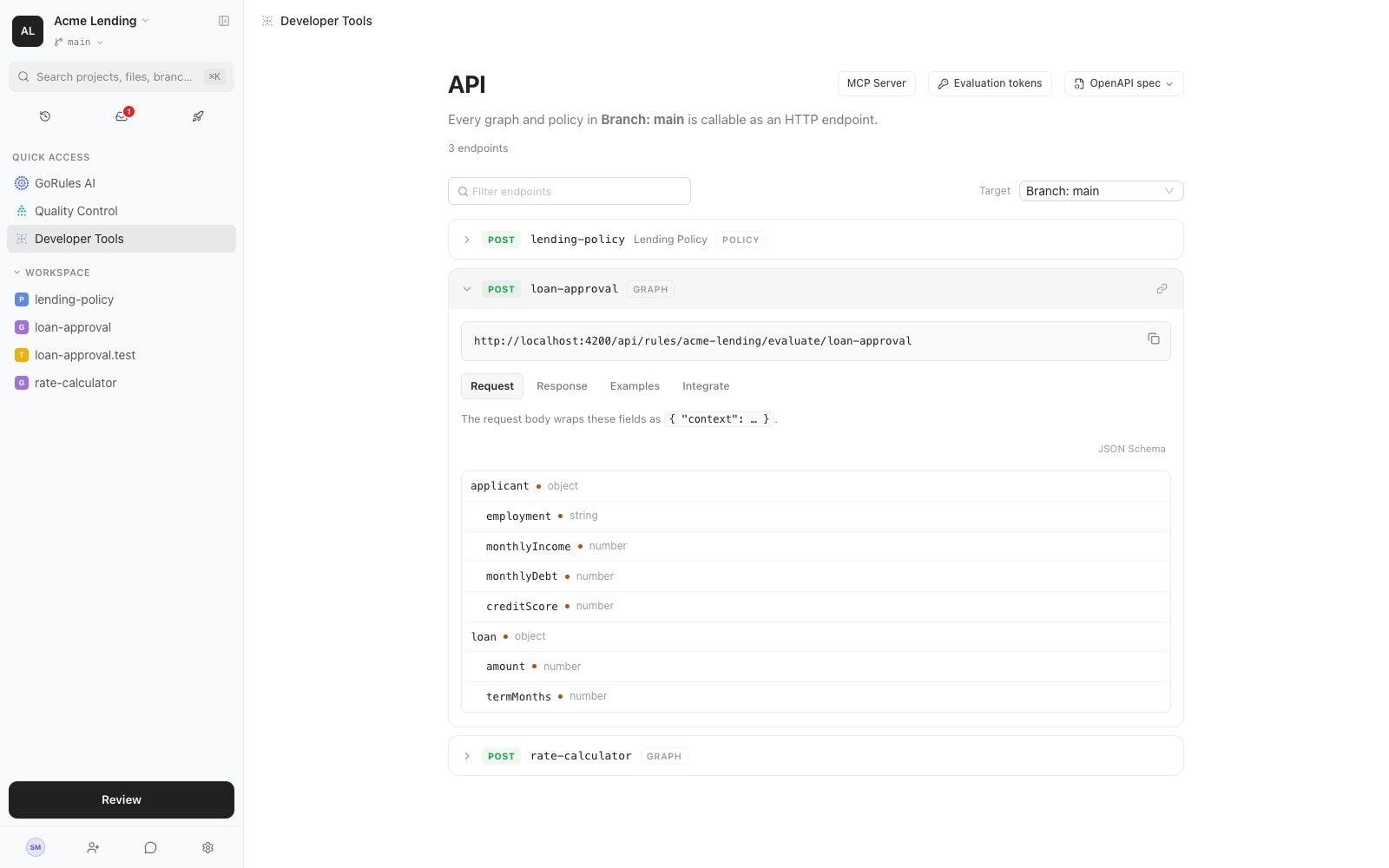
Open **Developer Tools** from the project sidebar. Every graph and policy in the scope you're viewing - branch, commit, release, or environment - is callable as an HTTP endpoint. The page lists each document's endpoint, request and response schemas, ready-made payloads, and integration snippets.
 ## Evaluate a decision
All evaluation endpoints accept `POST` with the input wrapped in `context`, and authenticate with a project access token in the `X-Access-Token` header:
```bash cURL theme={null}
curl -X POST "https://brms.example.com/api/rules/acme-lending/evaluate/loan-approval" \
-H "X-Access-Token: $GORULES_TOKEN" \
-H "Content-Type: application/json" \
-d '{
"context": {
"applicant": { "employment": "EMPLOYED", "monthlyIncome": 6500, "monthlyDebt": 1200, "creditScore": 760 },
"loan": { "amount": 25000, "termMonths": 60 }
},
"trace": false
}'
```
```javascript Node.js theme={null}
const response = await fetch(
"https://brms.example.com/api/rules/acme-lending/evaluate/loan-approval",
{
method: "POST",
headers: {
"X-Access-Token": process.env.GORULES_TOKEN,
"Content-Type": "application/json",
},
body: JSON.stringify({
context: {
applicant: { employment: "EMPLOYED", monthlyIncome: 6500, monthlyDebt: 1200, creditScore: 760 },
loan: { amount: 25000, termMonths: 60 },
},
trace: false,
}),
},
);
if (!response.ok) {
throw new Error(`Evaluation failed: ${response.status}`);
}
const { result } = await response.json();
```
```python Python theme={null}
import os
import requests
response = requests.post(
"https://brms.example.com/api/rules/acme-lending/evaluate/loan-approval",
headers={"X-Access-Token": os.environ["GORULES_TOKEN"]},
json={
"context": {
"applicant": {"employment": "EMPLOYED", "monthlyIncome": 6500, "monthlyDebt": 1200, "creditScore": 760},
"loan": {"amount": 25000, "termMonths": 60},
},
"trace": False,
},
)
response.raise_for_status()
result = response.json()["result"]
```
Response:
```json theme={null}
{
"performance": "156.2µs",
"result": {
"status": "approved",
"approved": true,
"reason": "Approved at standard rate",
"debtToIncome": 0.18
}
}
```
Set `"trace": true` to include a per-node `trace` object with each node's input, output, and execution time.
## Endpoints
`{projectId}` accepts either the project ID or the project key (`acme-lending` above). `{path}` is the document's path within the project, for example `loan-approval` or `billing/invoice-validation`.
| Source | Endpoint |
| ---------------- | ----------------------------------------------------------------- |
| Main branch head | `POST /api/rules/{projectId}/evaluate/{path}` |
| Branch head | `POST /api/rules/{projectId}/branch/{branchId}/evaluate/{path}` |
| Commit | `POST /api/rules/{projectId}/commit/{commitId}/evaluate/{path}` |
| Release | `POST /api/rules/{projectId}/release/{releaseId}/evaluate/{path}` |
| Environment | `POST /api/rules/{projectId}/env/{environmentId}/evaluate/{path}` |
A `GET` on each source root (the same URL without `/evaluate/{path}`) returns the OpenAPI document for that source.
Point production integrations at an environment: [deploying a release](/brms/deploy/environments) swaps the rules behind the endpoint with no client changes. Branch and commit endpoints evaluate draft content, which is useful for CI and pre-production testing.
## API explorer
The **Target** selector switches every endpoint, schema, and snippet on the page between sources: `Branch: main`, any other branch, a commit, a release, an environment, or `MCP Server (local)`.
Each endpoint expands into four tabs:
| Tab | Contents |
| --------- | ----------------------------------------------------------------------------------------------------------------------------------------- |
| Request | Input fields inferred from the document, with types and required flags; the body wraps them as `{ "context": … }` |
| Response | Output schema inferred from the document |
| Examples | Up to three payloads taken from test cases that reference the document, or a skeleton generated from the input schema when no tests exist |
| Integrate | Copy-paste snippets for cURL, Node.js, Python, Go, Rust, C#, Java, and Kotlin |
The **Native** toggle on the Integrate tab switches snippets from HTTP calls to the embedded ZEN Engine, evaluating the same document in-process with the [SDKs](/developers/sdks/nodejs).
## Evaluation tokens
Evaluation endpoints authenticate with project access tokens, generated in project settings. A token is either **Full access** or restricted with **Custom scopes**:
| Allowed action | Grants |
| -------------- | --------------------------------------- |
| Evaluate | Run rules via the evaluation endpoints |
| List rules | Fetch the OpenAPI document for a source |
| Store traces | Persist evaluation traces |
Custom-scoped tokens also narrow which evaluation targets they may hit: Branch/Commit (the main-branch head, any branch head, and pinned commits), Releases, or a specific environment. Nothing selected means all targets. A token without scopes has full access.
On the API page, **Evaluation tokens** lists the tokens valid for the currently selected target, so you can copy one that will actually authorize the request.
Scope production tokens to a single environment with only the Evaluate action. A leaked token then can't read rule definitions or evaluate draft content.
## OpenAPI spec
The **OpenAPI spec** dropdown offers **Download JSON**, **Copy spec URL**, and **Copy cURL** for the selected target. The same document is served by the API:
```bash theme={null}
curl "https://brms.example.com/api/rules/{projectId}/env/{environmentId}" \
-H "X-Access-Token: $GORULES_TOKEN"
```
The spec contains one operation per graph and policy, with input and output JSON Schemas derived from the documents, examples pulled from test cases, and security declared as an `apiKey` scheme on the `X-Access-Token` header. Each operation carries an `x-gorules` extension with the document `path`, `kind` (graph or policy), a `contentHash`, `hasInputSchema`, and `hasOutputSchema` - enough metadata to drive client generators or your own tooling.
### Generate typed clients
Because each operation's `context` schema is derived from the document's input schema, any OpenAPI code generator turns the spec into compile-time types for your rules. With [openapi-typescript](https://openapi-ts.dev):
```bash theme={null}
curl -H "X-Access-Token: $GORULES_TOKEN" \
"https://brms.example.com/api/rules/acme-lending/env/production" -o rules-spec.json
npx openapi-typescript rules-spec.json -o rules.d.ts
```
Then evaluate with full type safety - wrong field names or types in `context` fail at compile time:
```typescript theme={null}
import createClient from 'openapi-fetch';
import type { paths } from './rules';
const client = createClient({
baseUrl: 'https://brms.example.com/api/rules/acme-lending/env/production',
headers: { 'X-Access-Token': process.env.GORULES_TOKEN },
});
const { data } = await client.POST('/evaluate/loan-approval', {
body: {
context: {
applicant: { employment: 'EMPLOYED', monthlyIncome: 6500, monthlyDebt: 1200, creditScore: 760 },
loan: { amount: 25000, termMonths: 60 },
},
},
});
```
The same spec feeds generators for other languages, and the generated context types are equally useful when evaluating in-process with the [embedded SDKs](/developers/sdks/nodejs). Point the generator at a release or environment source so types match what production serves, and use each operation's `x-gorules.contentHash` to detect when rules changed and types need regenerating - a natural CI step.
Fields typed with a [dictionary](/brms/build/policies#dictionaries) appear in the spec as `{"$dictionary": "name"}` - a GoRules extension, not standard JSON Schema. Evaluation enforces the dictionary's values, but code generators don't recognise the keyword and type such fields loosely.
## MCP server
The **MCP Server** tab in Developer Tools bridges the browser workspace to AI agents such as Claude Code and Cursor through a local MCP endpoint.
```bash theme={null}
npx @gorules/cli mcp start
```
The CLI starts on port `41919` and prints a one-time 8-character token. Paste it into the **MCP Server** tab; the browser asks once for Local Network Access permission. The session status moves from Not connected through Verifying to Connected (or Blocked if the browser denies local network access).
A connected MCP client can:
* Read workspace files for the scope you're viewing - drafts, releases, or change requests.
* Use the same tools as GoRules AI: add nodes, edit decision tables, plan changes.
* Evaluate decisions with trace, performance, and intermediate state.
Traffic stays on `localhost:41919` and tokens rotate every CLI session. For CLI flags and client configuration, see [GoRules CLI](/developers/cli) and [MCP integration](/developers/mcp).
## Evaluate a decision
All evaluation endpoints accept `POST` with the input wrapped in `context`, and authenticate with a project access token in the `X-Access-Token` header:
```bash cURL theme={null}
curl -X POST "https://brms.example.com/api/rules/acme-lending/evaluate/loan-approval" \
-H "X-Access-Token: $GORULES_TOKEN" \
-H "Content-Type: application/json" \
-d '{
"context": {
"applicant": { "employment": "EMPLOYED", "monthlyIncome": 6500, "monthlyDebt": 1200, "creditScore": 760 },
"loan": { "amount": 25000, "termMonths": 60 }
},
"trace": false
}'
```
```javascript Node.js theme={null}
const response = await fetch(
"https://brms.example.com/api/rules/acme-lending/evaluate/loan-approval",
{
method: "POST",
headers: {
"X-Access-Token": process.env.GORULES_TOKEN,
"Content-Type": "application/json",
},
body: JSON.stringify({
context: {
applicant: { employment: "EMPLOYED", monthlyIncome: 6500, monthlyDebt: 1200, creditScore: 760 },
loan: { amount: 25000, termMonths: 60 },
},
trace: false,
}),
},
);
if (!response.ok) {
throw new Error(`Evaluation failed: ${response.status}`);
}
const { result } = await response.json();
```
```python Python theme={null}
import os
import requests
response = requests.post(
"https://brms.example.com/api/rules/acme-lending/evaluate/loan-approval",
headers={"X-Access-Token": os.environ["GORULES_TOKEN"]},
json={
"context": {
"applicant": {"employment": "EMPLOYED", "monthlyIncome": 6500, "monthlyDebt": 1200, "creditScore": 760},
"loan": {"amount": 25000, "termMonths": 60},
},
"trace": False,
},
)
response.raise_for_status()
result = response.json()["result"]
```
Response:
```json theme={null}
{
"performance": "156.2µs",
"result": {
"status": "approved",
"approved": true,
"reason": "Approved at standard rate",
"debtToIncome": 0.18
}
}
```
Set `"trace": true` to include a per-node `trace` object with each node's input, output, and execution time.
## Endpoints
`{projectId}` accepts either the project ID or the project key (`acme-lending` above). `{path}` is the document's path within the project, for example `loan-approval` or `billing/invoice-validation`.
| Source | Endpoint |
| ---------------- | ----------------------------------------------------------------- |
| Main branch head | `POST /api/rules/{projectId}/evaluate/{path}` |
| Branch head | `POST /api/rules/{projectId}/branch/{branchId}/evaluate/{path}` |
| Commit | `POST /api/rules/{projectId}/commit/{commitId}/evaluate/{path}` |
| Release | `POST /api/rules/{projectId}/release/{releaseId}/evaluate/{path}` |
| Environment | `POST /api/rules/{projectId}/env/{environmentId}/evaluate/{path}` |
A `GET` on each source root (the same URL without `/evaluate/{path}`) returns the OpenAPI document for that source.
Point production integrations at an environment: [deploying a release](/brms/deploy/environments) swaps the rules behind the endpoint with no client changes. Branch and commit endpoints evaluate draft content, which is useful for CI and pre-production testing.
## API explorer
The **Target** selector switches every endpoint, schema, and snippet on the page between sources: `Branch: main`, any other branch, a commit, a release, an environment, or `MCP Server (local)`.
Each endpoint expands into four tabs:
| Tab | Contents |
| --------- | ----------------------------------------------------------------------------------------------------------------------------------------- |
| Request | Input fields inferred from the document, with types and required flags; the body wraps them as `{ "context": … }` |
| Response | Output schema inferred from the document |
| Examples | Up to three payloads taken from test cases that reference the document, or a skeleton generated from the input schema when no tests exist |
| Integrate | Copy-paste snippets for cURL, Node.js, Python, Go, Rust, C#, Java, and Kotlin |
The **Native** toggle on the Integrate tab switches snippets from HTTP calls to the embedded ZEN Engine, evaluating the same document in-process with the [SDKs](/developers/sdks/nodejs).
## Evaluation tokens
Evaluation endpoints authenticate with project access tokens, generated in project settings. A token is either **Full access** or restricted with **Custom scopes**:
| Allowed action | Grants |
| -------------- | --------------------------------------- |
| Evaluate | Run rules via the evaluation endpoints |
| List rules | Fetch the OpenAPI document for a source |
| Store traces | Persist evaluation traces |
Custom-scoped tokens also narrow which evaluation targets they may hit: Branch/Commit (the main-branch head, any branch head, and pinned commits), Releases, or a specific environment. Nothing selected means all targets. A token without scopes has full access.
On the API page, **Evaluation tokens** lists the tokens valid for the currently selected target, so you can copy one that will actually authorize the request.
Scope production tokens to a single environment with only the Evaluate action. A leaked token then can't read rule definitions or evaluate draft content.
## OpenAPI spec
The **OpenAPI spec** dropdown offers **Download JSON**, **Copy spec URL**, and **Copy cURL** for the selected target. The same document is served by the API:
```bash theme={null}
curl "https://brms.example.com/api/rules/{projectId}/env/{environmentId}" \
-H "X-Access-Token: $GORULES_TOKEN"
```
The spec contains one operation per graph and policy, with input and output JSON Schemas derived from the documents, examples pulled from test cases, and security declared as an `apiKey` scheme on the `X-Access-Token` header. Each operation carries an `x-gorules` extension with the document `path`, `kind` (graph or policy), a `contentHash`, `hasInputSchema`, and `hasOutputSchema` - enough metadata to drive client generators or your own tooling.
### Generate typed clients
Because each operation's `context` schema is derived from the document's input schema, any OpenAPI code generator turns the spec into compile-time types for your rules. With [openapi-typescript](https://openapi-ts.dev):
```bash theme={null}
curl -H "X-Access-Token: $GORULES_TOKEN" \
"https://brms.example.com/api/rules/acme-lending/env/production" -o rules-spec.json
npx openapi-typescript rules-spec.json -o rules.d.ts
```
Then evaluate with full type safety - wrong field names or types in `context` fail at compile time:
```typescript theme={null}
import createClient from 'openapi-fetch';
import type { paths } from './rules';
const client = createClient({
baseUrl: 'https://brms.example.com/api/rules/acme-lending/env/production',
headers: { 'X-Access-Token': process.env.GORULES_TOKEN },
});
const { data } = await client.POST('/evaluate/loan-approval', {
body: {
context: {
applicant: { employment: 'EMPLOYED', monthlyIncome: 6500, monthlyDebt: 1200, creditScore: 760 },
loan: { amount: 25000, termMonths: 60 },
},
},
});
```
The same spec feeds generators for other languages, and the generated context types are equally useful when evaluating in-process with the [embedded SDKs](/developers/sdks/nodejs). Point the generator at a release or environment source so types match what production serves, and use each operation's `x-gorules.contentHash` to detect when rules changed and types need regenerating - a natural CI step.
Fields typed with a [dictionary](/brms/build/policies#dictionaries) appear in the spec as `{"$dictionary": "name"}` - a GoRules extension, not standard JSON Schema. Evaluation enforces the dictionary's values, but code generators don't recognise the keyword and type such fields loosely.
## MCP server
The **MCP Server** tab in Developer Tools bridges the browser workspace to AI agents such as Claude Code and Cursor through a local MCP endpoint.
```bash theme={null}
npx @gorules/cli mcp start
```
The CLI starts on port `41919` and prints a one-time 8-character token. Paste it into the **MCP Server** tab; the browser asks once for Local Network Access permission. The session status moves from Not connected through Verifying to Connected (or Blocked if the browser denies local network access).
A connected MCP client can:
* Read workspace files for the scope you're viewing - drafts, releases, or change requests.
* Use the same tools as GoRules AI: add nodes, edit decision tables, plan changes.
* Evaluate decisions with trace, performance, and intermediate state.
Traffic stays on `localhost:41919` and tokens rotate every CLI session. For CLI flags and client configuration, see [GoRules CLI](/developers/cli) and [MCP integration](/developers/mcp).