> ## Documentation Index
> Fetch the complete documentation index at: https://docs.gorules.io/llms.txt
> Use this file to discover all available pages before exploring further.
# Requests
> Route merges, deployments, and publishing through team review and approval.
Requests let your team review important actions before they happen. Instead of merging a branch or deploying a release on the spot, you open a request; teammates review the proposed change, discuss it, and approve or reject it. Once the requirements are met, the request can be completed and the action goes through.
Whether an action needs a request depends on your project's settings - see [Approval requirements](#approval-requirements) below.
## The Requests page
Open Requests from the sidebar rail. A badge on the icon shows how many requests are pending. Filter the list by Pending, Completed, Cancelled, or Rejected, or search by name.
 Requests cover five kinds of action:
| Type | Example title | What completing it does |
| --------- | ------------------------------- | -------------------------------------- |
| Merge | Merge pricing-update to main | Merges the branch's commits into main. |
| Deploy | Deploy v1.4.0 to Production | Pushes a release to an environment. |
| Undeploy | Undeploy v1.4.0 from Production | Removes a release from an environment. |
| Publish | Publish Shipping Fees | Publishes a decision. |
| Unpublish | Unpublish Shipping Fees | Unpublishes a decision. |
Merge requests are opened from the Review page - see [Review & save](/brms/review/review). Deploy requests open automatically when you deploy a release to an environment marked "requires review" - see [Releases](/brms/deploy/releases).
## Inside a request
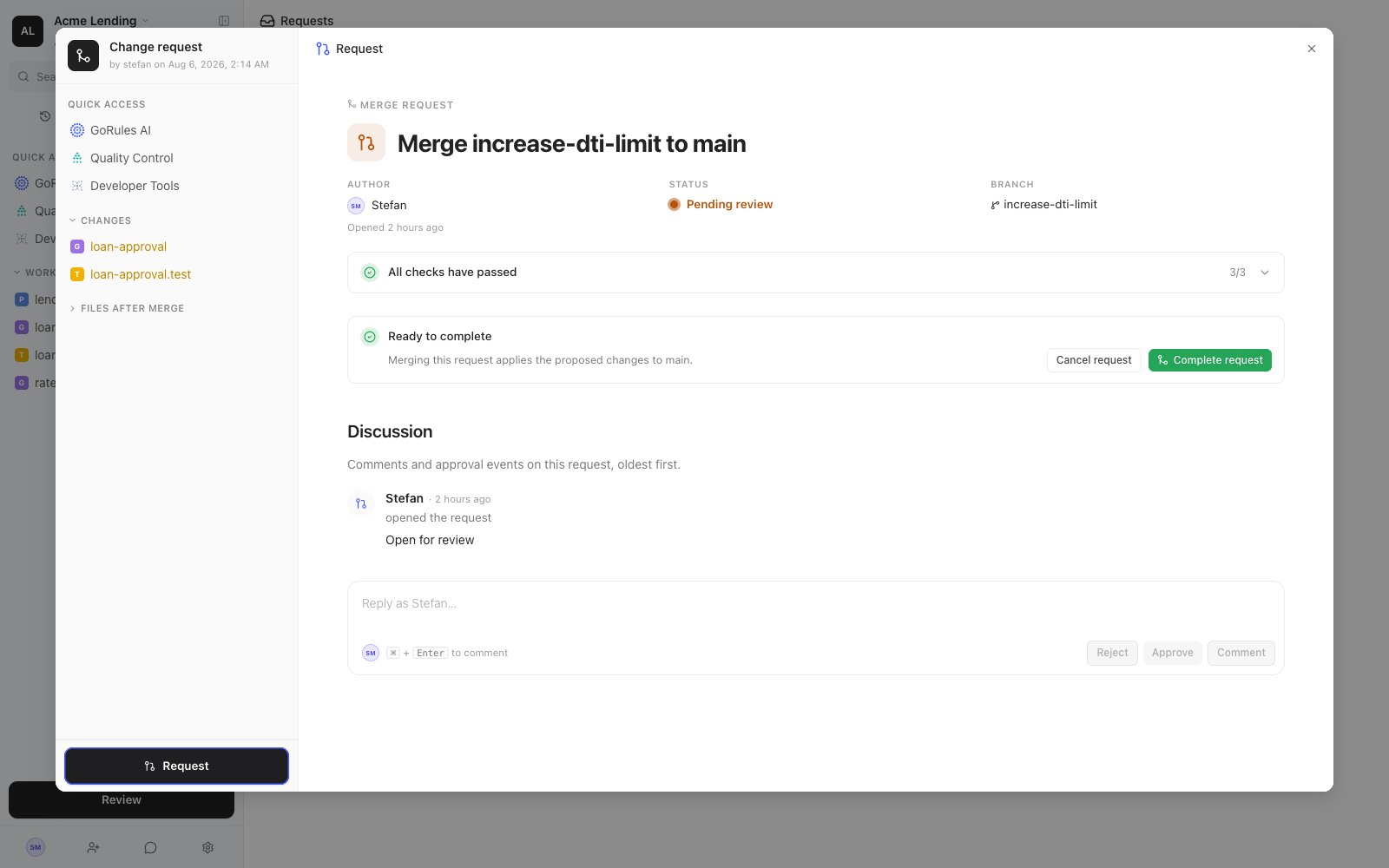
Selecting a request opens its detail pane. The header shows the essentials: Author, Branch, Type, Status, Approvals (for example "1/2 approval groups"), and when it was opened. For merge requests you can also browse the proposed file changes, shown as a diff against main.
### Discussion
The Discussion section is a timeline of everything that happened on the request, oldest first: who opened it, pushed changes, approved, withdrew approval, rejected it, completed it, or cancelled it - along with any comments.
The composer at the bottom offers four actions: **Comment**, **Approve**, **Reject**, and **Withdraw** (which takes back your earlier approval).
Authors can't approve or reject their own request. Every request needs a second pair of eyes.
### Completing a request
The completion block at the bottom of the pane tells you what's left:
| State | Meaning |
| --------------------------------- | ------------------------------------------------------------------------------------------------------------------------------------------------------------------------------------------------------------------------ |
| Ready to complete | All conditions are met. Click **Complete request** to carry out the action. |
| Awaiting approvals | Required approvals haven't come in yet. |
| Rebase required before completion | Main has moved on since the request was opened. Click **Rebase** to bring the branch up to date; if there are conflicts, you'll resolve them as described in [Branches](/brms/review/branches#keeping-a-branch-in-sync). |
| Nothing to merge | The branch has no changes compared to main. Push new changes or cancel the request. |
You can abandon a request at any time with **Cancel request**. Cancelling leaves the branch and its commits intact - only the request is closed.
## Approval requirements
Project settings define what a request needs before it can be completed:
* No approvals: actions go through directly, without a request.
* Request without approvals: a request is created for visibility, and anyone can complete it.
* Any one group: one approval from any of the project's approval groups is enough.
* One per group: each approval group must provide at least one approval.
Environments add their own layer: marking an environment as "requires review" means every deployment to it opens a deploy request, regardless of how it was triggered.
Pair approval requirements with a protected main branch. Contributors then save their work to branches, and every change reaches main through a reviewed merge request. Pre-flight checks on the [Review page](/brms/review/review) and tests from [Quality Control](/brms/quality/quality-control) give reviewers the signal they need to approve with confidence.
Requests cover five kinds of action:
| Type | Example title | What completing it does |
| --------- | ------------------------------- | -------------------------------------- |
| Merge | Merge pricing-update to main | Merges the branch's commits into main. |
| Deploy | Deploy v1.4.0 to Production | Pushes a release to an environment. |
| Undeploy | Undeploy v1.4.0 from Production | Removes a release from an environment. |
| Publish | Publish Shipping Fees | Publishes a decision. |
| Unpublish | Unpublish Shipping Fees | Unpublishes a decision. |
Merge requests are opened from the Review page - see [Review & save](/brms/review/review). Deploy requests open automatically when you deploy a release to an environment marked "requires review" - see [Releases](/brms/deploy/releases).
## Inside a request
Selecting a request opens its detail pane. The header shows the essentials: Author, Branch, Type, Status, Approvals (for example "1/2 approval groups"), and when it was opened. For merge requests you can also browse the proposed file changes, shown as a diff against main.
### Discussion
The Discussion section is a timeline of everything that happened on the request, oldest first: who opened it, pushed changes, approved, withdrew approval, rejected it, completed it, or cancelled it - along with any comments.
The composer at the bottom offers four actions: **Comment**, **Approve**, **Reject**, and **Withdraw** (which takes back your earlier approval).
Authors can't approve or reject their own request. Every request needs a second pair of eyes.
### Completing a request
The completion block at the bottom of the pane tells you what's left:
| State | Meaning |
| --------------------------------- | ------------------------------------------------------------------------------------------------------------------------------------------------------------------------------------------------------------------------ |
| Ready to complete | All conditions are met. Click **Complete request** to carry out the action. |
| Awaiting approvals | Required approvals haven't come in yet. |
| Rebase required before completion | Main has moved on since the request was opened. Click **Rebase** to bring the branch up to date; if there are conflicts, you'll resolve them as described in [Branches](/brms/review/branches#keeping-a-branch-in-sync). |
| Nothing to merge | The branch has no changes compared to main. Push new changes or cancel the request. |
You can abandon a request at any time with **Cancel request**. Cancelling leaves the branch and its commits intact - only the request is closed.
## Approval requirements
Project settings define what a request needs before it can be completed:
* No approvals: actions go through directly, without a request.
* Request without approvals: a request is created for visibility, and anyone can complete it.
* Any one group: one approval from any of the project's approval groups is enough.
* One per group: each approval group must provide at least one approval.
Environments add their own layer: marking an environment as "requires review" means every deployment to it opens a deploy request, regardless of how it was triggered.
Pair approval requirements with a protected main branch. Contributors then save their work to branches, and every change reaches main through a reviewed merge request. Pre-flight checks on the [Review page](/brms/review/review) and tests from [Quality Control](/brms/quality/quality-control) give reviewers the signal they need to approve with confidence.