> ## Documentation Index
> Fetch the complete documentation index at: https://docs.gorules.io/llms.txt
> Use this file to discover all available pages before exploring further.
# Quality Control
> Run every test in the workspace, track coverage, and review static analysis findings in one place.
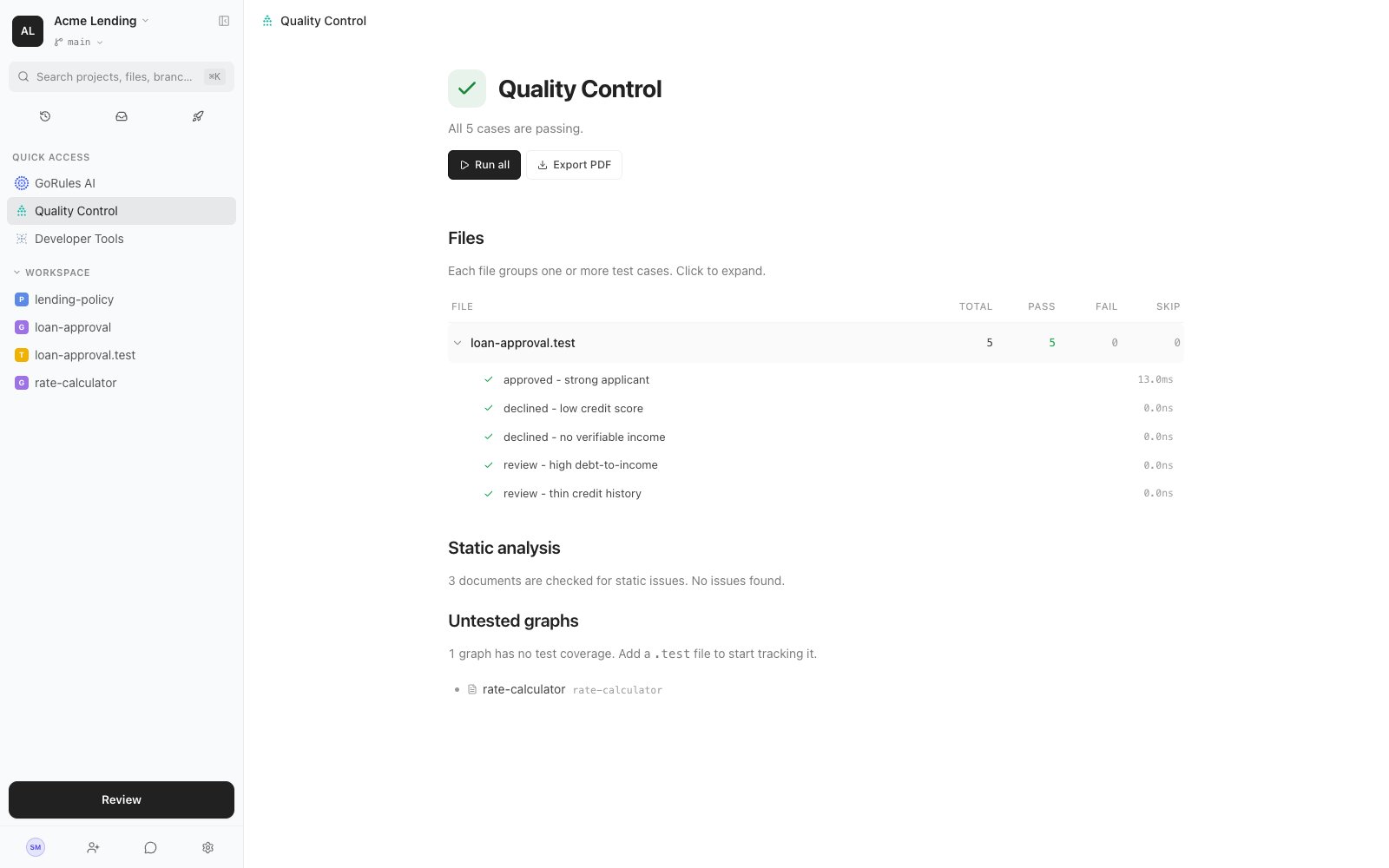
Quality Control is the project's health dashboard. It runs every test in the workspace, shows which graphs have no coverage, and surfaces every static analysis finding - so you can see at a glance whether the branch is safe to ship.
Open it from **Quality Control** in the sidebar's Quick Access.
 ## Running the suite
Click **Run all** to execute every test case in every test file on the current branch. The Files table shows one row per [test file](/brms/build/testing) with its totals - pass, fail, skip - and expands to individual cases with their status and timing.
Click **Export PDF** to produce a shareable report of the run - useful for sign-off, audits, or attaching to a release.
## Static analysis
Every graph and policy on the branch is checked continuously for static issues - type errors, conflicting rules, dead logic. The page summarises how many documents are clean and how many have findings; expand a file to see each diagnostic and click it to jump straight to the offending node or block.
See the [static analysis reference](/brms/quality/static-analysis) for every check and what it means.
## Untested graphs
Graphs with no test coverage are listed by name. Add a `.test` file alongside a graph and it moves into the Files table automatically. Coverage here is deliberately simple: a graph either has tests exercising it or it doesn't.
## Quality Control and shipping
The same signals appear as [pre-flight checks](/brms/review/review) whenever you save changes or [create a release](/brms/deploy/releases): tests, static analysis, and configuration are checked at the moment you publish. Quality Control is where you watch them continuously; pre-flight is where they meet your changes.
## Running the suite
Click **Run all** to execute every test case in every test file on the current branch. The Files table shows one row per [test file](/brms/build/testing) with its totals - pass, fail, skip - and expands to individual cases with their status and timing.
Click **Export PDF** to produce a shareable report of the run - useful for sign-off, audits, or attaching to a release.
## Static analysis
Every graph and policy on the branch is checked continuously for static issues - type errors, conflicting rules, dead logic. The page summarises how many documents are clean and how many have findings; expand a file to see each diagnostic and click it to jump straight to the offending node or block.
See the [static analysis reference](/brms/quality/static-analysis) for every check and what it means.
## Untested graphs
Graphs with no test coverage are listed by name. Add a `.test` file alongside a graph and it moves into the Files table automatically. Coverage here is deliberately simple: a graph either has tests exercising it or it doesn't.
## Quality Control and shipping
The same signals appear as [pre-flight checks](/brms/review/review) whenever you save changes or [create a release](/brms/deploy/releases): tests, static analysis, and configuration are checked at the moment you publish. Quality Control is where you watch them continuously; pre-flight is where they meet your changes.