> ## Documentation Index
> Fetch the complete documentation index at: https://docs.gorules.io/llms.txt
> Use this file to discover all available pages before exploring further.
# Policies
> Define shared dictionaries, data models, and rules once - then import them into any graph.
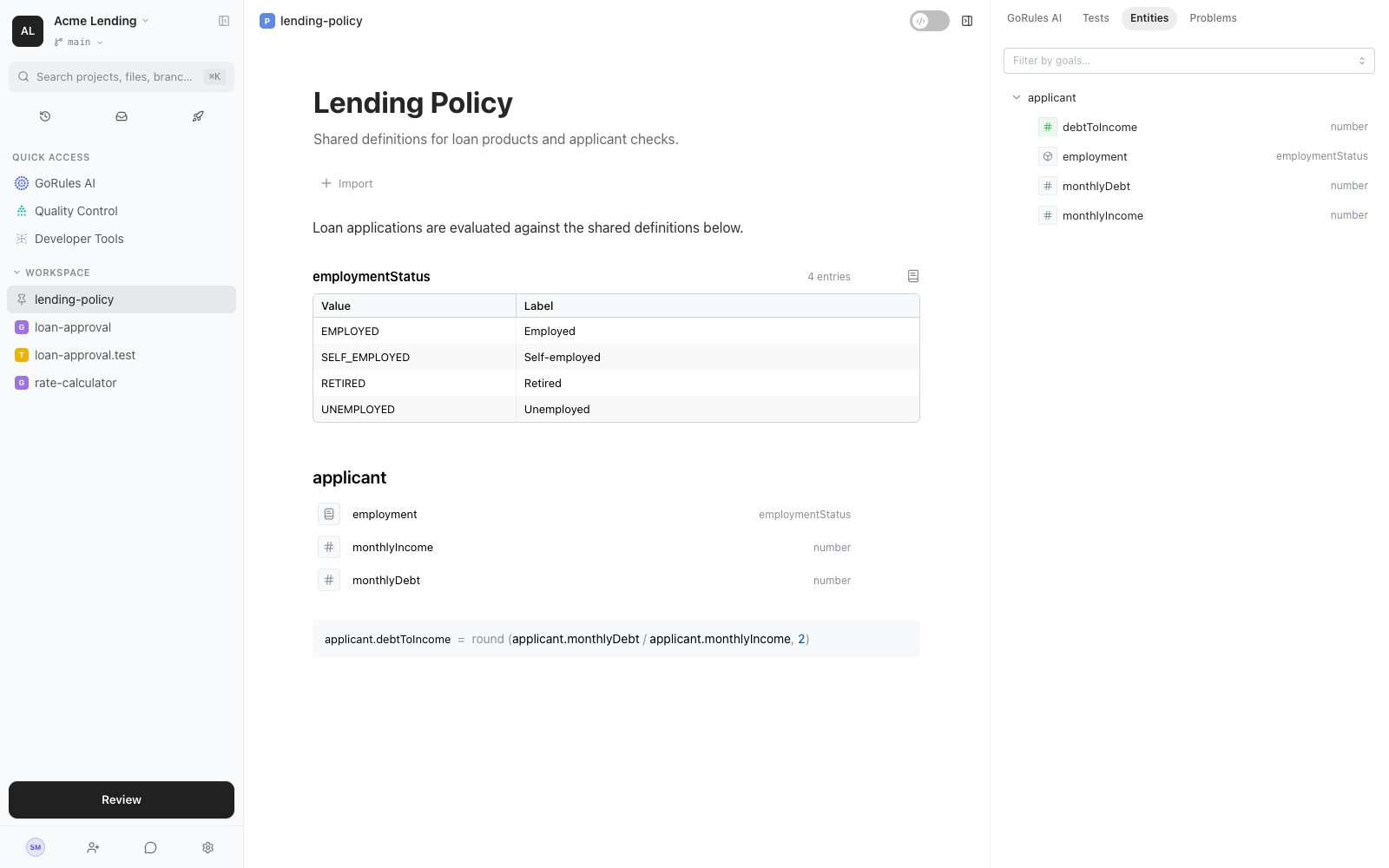
A policy is a document for the definitions and rules your whole project should agree on: the valid values for a field, the shape of your core entities, and the derived facts other rules build on. Write them once in a policy, then import the policy wherever it's needed.
Unlike a graph, a policy has no nodes or edges. It reads like a document - text and rule blocks mixed together - and the engine works out the evaluation order automatically from what each block reads and writes.
 If **Policy** doesn't appear in the New dialog, policies are not enabled for your organisation. Ask your administrator or contact support about enabling them.
## Writing a policy
Type `/` anywhere in the document to insert a block. Text blocks (headings, paragraphs, lists) document your rules; rule blocks define them:
| Block | What it does |
| -------------- | ------------------------------------------------- |
| Dictionary | A named list of valid values with display labels. |
| Data Model | Declares an entity and its typed properties. |
| Expression | Computes a value and writes it to a property. |
| Decision Table | Spreadsheet-style rules, same as in a graph. |
| Match | Routes between outcomes based on conditions. |
| Assertion | States a condition that must hold. |
| Globals | Shared values available everywhere. |
Block order doesn't matter. If one block computes `applicant.debtToIncome` and another reads it, the engine runs them in the right order - even across imported policies.
## Dictionaries
A dictionary is a named set of values with human-readable labels:
| Value | Label |
| --------------- | ------------- |
| `EMPLOYED` | Employed |
| `SELF_EMPLOYED` | Self-employed |
| `RETIRED` | Retired |
| `UNEMPLOYED` | Unemployed |
The value is what rules compare against and what evaluation sees; the label is what business users read. In business mode, rules render with labels - "applicant.employment *is one of* Employed, Self-employed".
Use a dictionary's name as a type: a data model property typed `employmentStatus` only accepts those four values, and [static analysis](/brms/quality/static-analysis) flags anything else at edit time. Graphs that import the policy can do the same in their input schema - a field defined as `{"$dictionary": "employmentStatus"}` accepts only those values at evaluation time. Dictionaries also support CSV import and export for longer value lists.
## Data models
A data model declares an entity - `applicant`, `customer`, `order` - and its properties with types: `string`, `number`, `boolean`, `date`, or any dictionary. Properties can be arrays or optional. Once declared, every rule that touches the entity is type-checked against it.
## Importing
Graphs import policies with the **Import** button on the canvas; policies import other policies through the `imports` in their header. An import brings the whole chain: importing a policy also pulls in everything it imports.
Imported policies evaluate together as one unit in a shared namespace. That has a practical consequence: two blocks writing the same property is a conflict (`DUPLICATE_WRITER`) even when they live in different files - the analyzer checks the whole import group together.
## Evaluating policies
A policy isn't just a library - it's directly executable. Send it an input object and it returns the object enriched with everything its blocks computed. Every policy gets its own HTTP endpoint alongside your graphs; see [Developer Tools](/developers/developer-tools).
## The side panel
The **Entities** tab lists every entity the policy defines or touches: each property's type, whether it's declared or computed, which blocks write it, and where it's used. The **Problems** tab shows [static analysis](/brms/quality/static-analysis) findings for the policy.
## Related pages
Import policies into your graphs.
How policies are checked across imports.
If **Policy** doesn't appear in the New dialog, policies are not enabled for your organisation. Ask your administrator or contact support about enabling them.
## Writing a policy
Type `/` anywhere in the document to insert a block. Text blocks (headings, paragraphs, lists) document your rules; rule blocks define them:
| Block | What it does |
| -------------- | ------------------------------------------------- |
| Dictionary | A named list of valid values with display labels. |
| Data Model | Declares an entity and its typed properties. |
| Expression | Computes a value and writes it to a property. |
| Decision Table | Spreadsheet-style rules, same as in a graph. |
| Match | Routes between outcomes based on conditions. |
| Assertion | States a condition that must hold. |
| Globals | Shared values available everywhere. |
Block order doesn't matter. If one block computes `applicant.debtToIncome` and another reads it, the engine runs them in the right order - even across imported policies.
## Dictionaries
A dictionary is a named set of values with human-readable labels:
| Value | Label |
| --------------- | ------------- |
| `EMPLOYED` | Employed |
| `SELF_EMPLOYED` | Self-employed |
| `RETIRED` | Retired |
| `UNEMPLOYED` | Unemployed |
The value is what rules compare against and what evaluation sees; the label is what business users read. In business mode, rules render with labels - "applicant.employment *is one of* Employed, Self-employed".
Use a dictionary's name as a type: a data model property typed `employmentStatus` only accepts those four values, and [static analysis](/brms/quality/static-analysis) flags anything else at edit time. Graphs that import the policy can do the same in their input schema - a field defined as `{"$dictionary": "employmentStatus"}` accepts only those values at evaluation time. Dictionaries also support CSV import and export for longer value lists.
## Data models
A data model declares an entity - `applicant`, `customer`, `order` - and its properties with types: `string`, `number`, `boolean`, `date`, or any dictionary. Properties can be arrays or optional. Once declared, every rule that touches the entity is type-checked against it.
## Importing
Graphs import policies with the **Import** button on the canvas; policies import other policies through the `imports` in their header. An import brings the whole chain: importing a policy also pulls in everything it imports.
Imported policies evaluate together as one unit in a shared namespace. That has a practical consequence: two blocks writing the same property is a conflict (`DUPLICATE_WRITER`) even when they live in different files - the analyzer checks the whole import group together.
## Evaluating policies
A policy isn't just a library - it's directly executable. Send it an input object and it returns the object enriched with everything its blocks computed. Every policy gets its own HTTP endpoint alongside your graphs; see [Developer Tools](/developers/developer-tools).
## The side panel
The **Entities** tab lists every entity the policy defines or touches: each property's type, whether it's declared or computed, which blocks write it, and where it's used. The **Problems** tab shows [static analysis](/brms/quality/static-analysis) findings for the policy.
## Related pages
Import policies into your graphs.
How policies are checked across imports.